Smart locks offer a modern solution for home security, often touted for their convenience and advanced features. But how secure are they really? As homes become smarter, evaluating the effectiveness of smart locks against potential threats is crucial. These devices replace traditional mechanical locks with electronic hardware that allows for keyless entry via smartphones, Wi-Fi, or Bluetooth connections. In this blog, we’ll explore what makes a smart lock secure, how they stack up against traditional locks, and best practices for using them securely. By understanding these aspects, you’ll be better equipped to decide if a smart lock is the right choice to safeguard your home.
What is a Smart Lock and How It Works
Key Components of Smart Locks
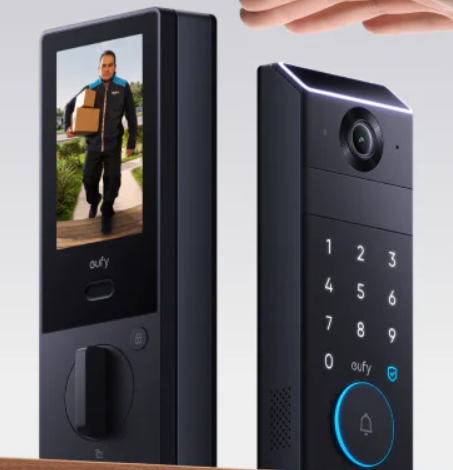
Smart locks consist of several main components: the mechanical lock mechanism, electronic or digital actuator, and communication module. The mechanical part interacts with your existing door hardware, while the electronic actuator controls the lock’s operation without a physical key. A digital interface allows users to lock or unlock doors using smartphones, key fobs, or numeric keypads.
Typical Wireless Protocols and Communication
Smart locks use wireless communication protocols like Bluetooth, Wi-Fi, Zigbee, or Z-Wave to interact with apps or control systems. Bluetooth and Wi-Fi enable direct connectivity with smartphones, offering remote control capabilities. Zigbee and Z-Wave are often used in broader smart home ecosystems, providing energy-efficient, secure communication by creating mesh networks that enhance reliability and range.
Strong Security Features in Modern Smart Locks
Encryption, Authentication & Firmware Safeguards
Most smart locks employ strong encryption protocols to protect data transmitted between the lock and your control device. Authentication features such as personal identification numbers (PINs), biometric verification, or mobile app password protection add another layer of digital defense. Regular firmware updates from manufacturers address vulnerabilities, ensuring that locks remain resistant to emerging security threats.
Physical Build-Quality, Tamper Alerts & Backup Power
In addition to tech features, the physical design of smart locks is critical. High-quality materials and robust construction deter physical break-ins. Many models include tamper alerts that notify users of any unauthorized attempts to access or manipulate the lock. Backup power sources, such as batteries or mechanical keys, ensure functionality during power outages or if the electronic systems fail.
How to Evaluate a Smart Lock Manufacturer
Brand Reputation, Certifications, Update Policy
Look for reputable manufacturers with positive customer feedback and recognized security certifications, such as ANSI or BHMA ratings. A solid update policy indicates the manufacturer’s commitment to maintaining security, as timely firmware releases fix known vulnerabilities and ensure ongoing protection. Additionally, check whether the brand provides responsive customer support, transparent data handling policies, and compatibility with major smart home platforms, ensuring long-term usability, reliability, and peace of mind for homeowners seeking advanced smart lock performance.
Example: The eufy Smart Lock Collection and Its Security Claims
eufy offers a range of smart locks with a focus on security features, such as high-grade encryption and advanced biometric sensors. Their commitment to regular software updates and robust physical design illustrates how a reliable brand can enhance home security. Their locks also include tamper alerts and backup power options, providing comprehensive security measures. eufy’s integration with voice assistants like Alexa and Google Assistant adds convenience, while end-to-end encryption ensures user data remains private, reinforcing trust and modernizing entry access for tech-savvy households everywhere.
Best Practices for Using a Smart Lock Securely
Secure Your Wi-Fi & App, Enable Two-Factor, Update Firmware
Always secure your home network with strong passwords and encryption settings, as smart locks rely on Wi-Fi for external access. Use apps that offer two-factor authentication for added security. Regularly update the lock’s firmware to mitigate vulnerabilities and enhance functionality. Consider setting up network segmentation to isolate smart devices, perform periodic password audits, and review app permissions to reduce the risk of unauthorized access through compromised networks or outdated software vulnerabilities.
Keep Mechanical Key Option, Monitor Access Logs, Set Strong Codes
Maintain the lock’s mechanical key option for emergencies. Monitoring access logs helps track who enters your home and when, providing valuable data in case of security incidents. Set strong PIN codes and regularly change them to keep unauthorized users at bay. Establish unique user profiles for family members or guests, utilize notifications for entry events, and disable old access credentials immediately after use to maintain comprehensive and proactive control over your home’s digital entry system.
Conclusion
Smart locks offer advanced security features but must be chosen and configured wisely to safeguard your home effectively. By understanding the technology, potential vulnerabilities, and best practices for secure use, smart locks can provide a reliable and convenient alternative to traditional locks. Whether prioritizing digital security through encryption and authentication or ensuring physical integrity with robust construction, these devices can enhance home security when used correctly. Always consider the manufacturer’s reputation and stay informed about updates and new security measures. Through thoughtful selection and usage, a smart lock can truly protect your home.